iggy wave
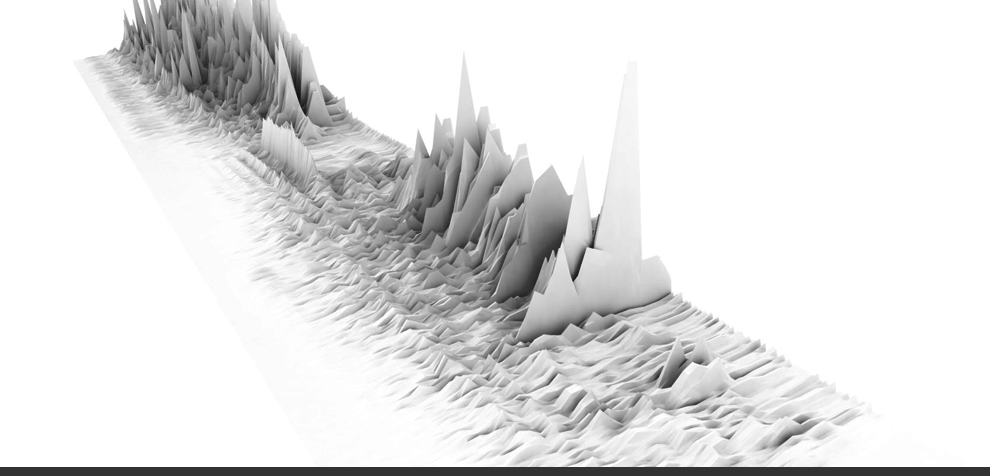
“Now I Wanna Be Your Dog” as a 3d landscape. I was using the minim library in processing to visualize the sound level data stream, then exporting out to rhino. Many thanks to the proxyarch team for help with the code.
EDIT:
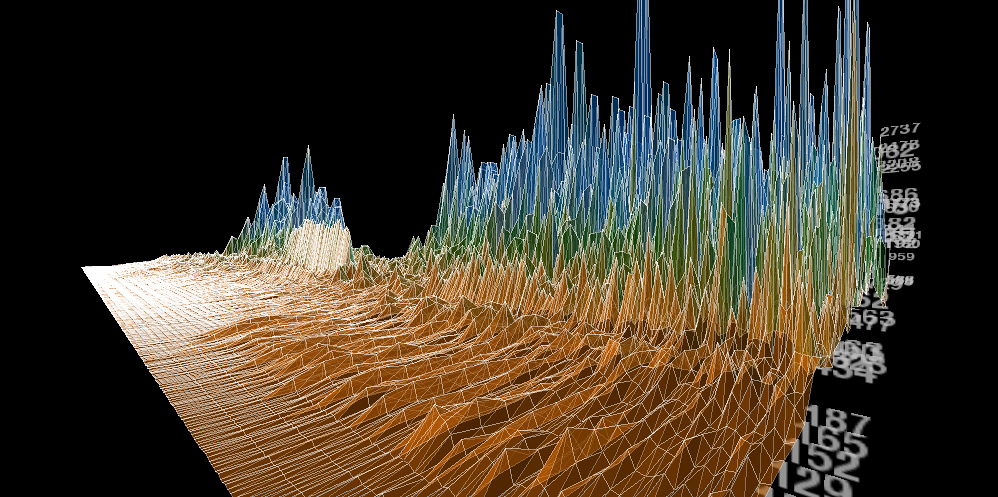
Added link to processing app, see it in action (loud rock music will begin playing…so turn it up!)
http://gracefulspoon.com/processingapps/singlewave/index.html
import processing.dxf.*;
import ddf.minim.analysis.*;
import ddf.minim.*;
FFT fftLin;
FFT fftLog;
Waveform myRects;
Minim minim;
AudioPlayer groove;
boolean record;
void setup(){
size(1000, 500, P3D);
noStroke();
minim = new Minim(this);
groove = minim.loadFile(“groove.mp3”);
groove.loop();
background(255);
fftLog = new FFT(groove.bufferSize(), groove.sampleRate());
fftLog.logAverages(22, 4); //adjust spacing here
float w = float(width/fftLog.avgSize());
float x = w;
float y = 0;
float z = 50;
float radius = 10;
myRects = new Waveform(x,y,z,radius);
}
void draw(){
background(0);
directionalLight(126,126,126,sin(radians(frameCount)),cos(radians(frameCount)),1);
ambientLight(102,102,102);
float zoom = 1000;
PVector foc = new PVector(myRects.x*0.5, myRects.y*0.5, 0);
PVector cam = new PVector(zoom*sin(radians(frameCount)), zoom*cos(radians(frameCount)), -zoom);
camera(foc.x+cam.x,foc.y+cam.y,foc.z+cam.z,foc.x,foc.y,foc.z,0,0,1);
//play the song
fftLog.forward(groove.mix);
myRects.update();
if(record){
beginRaw(DXF, “output.dxf”);
}
// DXF will export the stuff drawn between here.
myRects.plotTrace();
if(record){
endRaw();
record = false;
println(“Done DXF~!”);
}
}
void stop() {
// always close Minim audio classes when you finish with them
groove.close();
// always stop Minim before exiting
minim.stop();
super.stop();
}
class Waveform{
float x,y,z;
float radius;
PVector[] pts = new PVector[fftLog.avgSize()];
PVector[] trace = new PVector[0];
Waveform(float incomingX, float incomingY, float incomingZ, float incomingRadius){
x = incomingX;
y = incomingY;
z = incomingZ;
radius = incomingRadius;
}
void update(){
plot();
}
void plot(){
for(int i = 0; i < fftLog.avgSize(); i++){
int w = int(width/fftLog.avgSize());
x = i*w;
y = frameCount*5;
z = height/4-fftLog.getAvg(i)*10;
stroke(0);
point(x, y, z);
pts[i] = new PVector(x, y, z);
trace = (PVector[]) expand(trace, trace.length+1);
trace[trace.length-1] = new PVector(pts[i].x, pts[i].y, pts[i].z);
}
}
void plotTrace(){
/*
//drawing points
for(int i=0; i44 Responses to “iggy wave”
reply
September 2nd, 2009 at 1:06 am
beautiful. I am getting an unexpected character (\) at the groove.mp3 file line. I have the newest minim lib and renamed my audio file appropriately. Any ideas? write back at gabriel at gabrielmathews dot com…
Thanks!
September 2nd, 2009 at 4:51 pm
Thanks for the comment. So, what I hope is happening here is one of two things:
Thing 1: When you copy text from a doc file or website or whatever into the processing app it converts all the quotation marks into a character set that processing can’t recognize (Processing only knows vertical quotation marks, whereas notepad uses a different character for an opening and a closing mark). The solution would be to simply retype each quotation mark in processing.
Thing 2: Whatever the mp3 file is called, make sure you change it to the more generic “groove.mp3.” It could be that processing can’t find the file so double check that it is in the same root folder as the processing file.
If neither of those get it working, let me know,
best,
John
December 10th, 2009 at 2:09 pm
Hey John,
I just stumbled accross your page, and i thought this looked amazing, so i wanted to try it out.
but im getting an error:
processing.app.debug.RunnerException: unexpected token: i
on the first line of this setion:
for(int i=1; i if(i%inc != 0){
beginShape(TRIANGLE_STRIP);
vertex(trace[i].x, trace[i].y, trace[i].z);
vertex(trace[i-1].x, trace[i-1].y, trace[i-1].z);
vertex(trace[i+inc].x, trace[i+inc].y, trace[i+inc].z);
vertex(trace[i-1+inc].x, trace[i-1+inc].y, trace[i-1+inc].z);
endShape(CLOSE);
}
appologies if this is a silly question, im very new to processing, just playing around really.
Cheers,
Phil.
December 12th, 2009 at 12:56 pm
Hi Phil,
One of the vagaries of processing is that it doesn’t like to copy and paste text and that’s most likely what’s going on here. Anyway, a better way to share code is probably to actually link to the processing app, so that’s here: http://gracefulspoon.com/processingapps/singlewave/index.html the code should remain formatted and provide a better means to investigate. Let me know if it’s still not working for you. best, john
December 13th, 2009 at 9:08 am
That’s working perfectly now, thanks so much for your help!
Phil.
February 25th, 2010 at 7:09 am
Hi,
I’m just trying processing for the fisrt time and i’m not sure why but when it gets to
Waveform myRects;
is says it cant find it. Why is this happening?
Thanks,
Alex
March 1st, 2010 at 10:01 am
Hi, I’ve been trying to find out how to create your image above and I’m having few problems, it keeps coming up with the following error message and when i hit play the screen is blank white. Do you know what i can do to fix it?
Exception in thread “Animation Thread” java.lang.NullPointerException
at ddf.minim.javasound.JSMinim.getAudioInputStream(JSMinim.java:604)
at ddf.minim.javasound.JSMinim.getAudioRecordingStream(JSMinim.java:200)
at ddf.minim.Minim.loadFile(Minim.java:357)
at ddf.minim.Minim.loadFile(Minim.java:341)
at sketch_mar01a.setup(sketch_mar01a.java:45)
at processing.core.PApplet.handleDraw(PApplet.java:1402)
at processing.core.PApplet.run(PApplet.java:1327)
at java.lang.Thread.run(Thread.java:619)
Thanks, Alex
March 2nd, 2010 at 9:06 pm
Hi Alex, looks like either the minim library isn’t loaded into processing or you’re missing an audio file named “groove.mp3” in your data folder. If that doesn’t help, try to download a .rar with the processing file and mp3 from here: gracefulspoon.com/processingapps/waveform_landscape04.rar If that still doesn’t work let me know.
best, John
March 23rd, 2010 at 10:05 pm
Hi John,
Thank you for posting this!! I’ve checked out your site a few times now and find it really intriguing. I’m working on a thesis project here in Philadelphia which is about ways to visualize sound and apply that to design. Currently I’ve done some experiments with code I’ve found online and have built a few study models ( http://www.grasshopper3d.com/photo/photo/listForContributor?screenName=2luhs3b9vc16z ).
I’m really looking to get into this more in the next couple of weeks and generate some forms besides topographies from the sound. The problem is that I don’t know much at all about programming other than what is possible. Fortunately the online Processing and Grasshopper/Rhino community has been very supportive and helpful. Anyway, I was wondering if you might be able to help with a couple questions about sound generated forms?
About this particular code- how can I change/control the animation? how can I export or import this into a mesh or point cloud that I can use in Rhino? Is there a way to just play/pause certain parts to use in Rhino or make it not loop? when I ran the file, I couldn’t see where it was saving to..where/how in the code do I control this?
Another question I had was how could I use processing to make different 3D objects? One idea I had was to have a set of tetrahedronal modules/blocks for each key on a piano..so, I would set the basic parameters and the sound would essentially do the rest. In theory, a better music composition would in-effect make a better structured object. I’ve got a lot of other experiments I’d like to try as well…just as renderings and actual objects when possible. Maybe we could even collaborate on some projects in the near future.
Thank you for any help or suggestions.
feel free to email me directly too..
Matt
June 16th, 2010 at 12:53 pm
how can i make it the same as the image above ? (filled gray )
June 20th, 2010 at 12:00 pm
Shay,
hit “r” while the program is running, it will place a dxf file in your sketch folder. Open this dxf in rhino, set the render engine to vray, load the vray preset “gi_irmap_high,” hit render and you’re all set.
September 19th, 2011 at 11:01 am
[…] 3D Spectrogram created using Processing based on code by John Locke. […]
September 29th, 2011 at 11:21 am
[…] 3D spectrogram created with Processing. Realtime visualization of sound using a microphone or line in. Modified code to allow for realtime recording using line in or microphone. Based on code by John Locke. Link […]
October 3rd, 2011 at 8:00 am
[…] Audio recording of laser created by a computer mouse. Recorded with two photocells and a Zoom H2. 3D Spectrogram created using Processing based on code by John Locke. […]
October 3rd, 2011 at 8:01 am
[…] 3D spectrogram created with Processing. Realtime visualization of sound using a microphone or line in. Modified code to allow for realtime recording using line in or microphone. Based on code by John Locke. Link […]
April 1st, 2012 at 6:28 pm
Hey, I’ve tried to delete the older waves by editing your code in the plot() function but I can’t seem to get it right
it should be easy by having the trace list with a static size and then by shifting its shapes, so the older ones
can disappear…
Can you help me?
December 10th, 2012 at 11:50 pm
[…] him/her. For the sound input, I’ve used the ‘minim’ library, that you can find here (some great examples there). What it creates is a motion+sound visualization which shows your […]
February 15th, 2013 at 3:35 pm
I am very new to Processing and coding in general. I was trying to insert my own song into your code to get a different result and seem to be running into a couple of issues. One, the font is giving me trouble as I don’t have Helvetica. I have tried getting around this issue with a more universal font type, but to no avail. Also, I keep getting a NullPointerException message every time I try to run. Any help?
February 15th, 2013 at 6:08 pm
Jacob, download a .rar file of the processing sketch + the font, mp3, etc. from here: http://gracefulspoon.com/processingapps/waveform_landscape04.rar and let me know if that works.
February 15th, 2013 at 7:02 pm
I’m beginning to think it’s a graphics issue. I’ll link to the message I’m getting in Processing: http://sharetext.org/E8Vm
February 17th, 2013 at 8:18 pm
trying to export the dxf file but I get a similar error, like this:
java.lang.NullPointerException
at processing.mode.java.runner.Runner.findException(Runner.java:707)
at processing.mode.java.runner.Runner.reportException(Runner.java:652)
at processing.mode.java.runner.Runner.exception(Runner.java:595)
at processing.mode.java.runner.EventThread.exceptionEvent(EventThread.java:367)
at processing.mode.java.runner.EventThread.handleEvent(EventThread.java:255)
at processing.mode.java.runner.EventThread.run(EventThread.java:89)
Exception in thread “Animation Thread” java.lang.RuntimeException: RawDXF can only be used with beginRaw(), because it only supports lines and triangles
at processing.dxf.RawDXF.beginShape(Unknown Source)
at processing.opengl.PGraphicsOpenGL.rawPoints(PGraphicsOpenGL.java:2624)
at processing.opengl.PGraphicsOpenGL.flush(PGraphicsOpenGL.java:2298)
at processing.opengl.PGraphicsOpenGL.endShape(PGraphicsOpenGL.java:2006)
at processing.core.PApplet.endShape(PApplet.java:10779)
at waveform_landscape04$Waveform.plotTrace(waveform_landscape04.java:189)
at waveform_landscape04.draw(waveform_landscape04.java:90)
at processing.core.PApplet.handleDraw(PApplet.java:2142)
at processing.opengl.PGL$PGLListener.display(PGL.java:2472)
at jogamp.opengl.GLDrawableHelper.displayImpl(GLDrawableHelper.java:548)
at jogamp.opengl.GLDrawableHelper.display(GLDrawableHelper.java:533)
at jogamp.opengl.GLAutoDrawableBase$2.run(GLAutoDrawableBase.java:280)
at jogamp.opengl.GLDrawableHelper.invokeGLImpl(GLDrawableHelper.java:904)
at jogamp.opengl.GLDrawableHelper.invokeGL(GLDrawableHelper.java:822)
at com.jogamp.newt.opengl.GLWindow.display(GLWindow.java:543)
at processing.opengl.PGL.requestDraw(PGL.java:814)
at processing.opengl.PGraphicsOpenGL.requestDraw(PGraphicsOpenGL.java:1566)
at processing.core.PApplet.run(PApplet.java:2020)
at java.lang.Thread.run(Thread.java:680)
February 18th, 2013 at 2:35 pm
The .rar file did work, thank you. I have inserted a different song into the code to get a different result, but exporting the DXF file yields no results. The file is about 1MB, but is blank when opened in Rhino or AutoCAD. Any suggestions?
March 8th, 2013 at 5:47 pm
bravo
I’m a French graphic designer, and I was looking for a tool that can display the sound (the ridges) of a song.
I wish to retrieve images. However, I do not know how.
should I open the file with CorelDraw dfx or 3D software?
do I extract images with quicktime movie maker? (but this function does not work: Tool> Movie Maker
Again congratulation and sorry for my english
Chris
March 9th, 2013 at 11:07 pm
Hi Chris, you could either take screenshots of the program running, or open up the 3d model of the waveform in any 3d program and render/manipulate it from there. Awesome work!
March 11th, 2013 at 3:08 pm
hi!
thank you for your answer, unfortunately I could not use 3D software, I try to mess with RHINO, Illustrator (it can open Dfx files), AUTOCAD and SKETCHUP, but I can’t do anything, nothing works…
playing with your code I have the waves in profile.
I will work from screenshots.
I have all the same question (problem)
as you can see in the following screenshot, everything is centered, how to make the animation move the bottom left?
I do not understand how the camera
http://www.karmaorange.com/ScreenShot374.png
http://www.karmaorange.com/ScreenShot373.png
Again thank you
March 11th, 2013 at 3:58 pm
Chris, let the file run for awhile, then hit the ‘r’ key, this will make the .dwg 3d file in your sketch folder. Open that in your 3d program, not the actual processing sketch. Let me know if you can see the “.dwg” file.
The camera location is called out in the code, I have it defined here: PVector cam = new PVector(zoom*sin(radians(frameCount)), zoom*cos(radians(frameCount)), -zoom);
camera(foc.x+cam.x,foc.y+cam.y,foc.z+cam.z,foc.x,foc.y,foc.z,0,0,1);. You can play around with those numbers to move the camera around, but you will have more control opening in a 3d program. Cheers
March 13th, 2013 at 5:51 am
HI john, tkank you for your help. to not clutter your comments I sent you an email on Gmail.
cheers
April 2nd, 2013 at 5:07 pm
[…] the sound. The visualisation software was developed in Processing and was based on code written by John Locke and Kyle Janzen. The additional features which I added […]
February 24th, 2014 at 2:01 am
Hi, I am trying to make this work but when I try to record it kicks this back… java.lang.ArrayIndexOutOfBoundsException and the dxf it creates has no information any ideas what this could be? I can include the full error read out if needed. Thanks!
February 24th, 2014 at 8:22 am
Michael, try using an older, 1.XX version of processing. The code hasn’t been re-written for version 2.0.
May 13th, 2014 at 3:09 pm
Hi John
Could you please help us – we are doing architecture project and we want to make the same sound diagram as you. But we are new in Grasshopper and we ask you for some advices where to past your code to start it working?
I look forward your response.
Best regards,
Daniel
December 4th, 2014 at 10:37 am
Hi John,
I’m quite new to processing but I finally got your file working. Amazing work! Thanks you again.
Before I find your file I was always thinking of how to visualize real time audio input. Grateful
if you advise me what I should add.
Best
Glee
February 17th, 2015 at 9:52 pm
John, thank you soo much for posting all of this! I’ve been playing around with processing and rhino, trying to get the same effect you have with the ‘iggy_wave’. I’ve changed fftLog.logAverages in order to try to get more of a ‘paper cutout’ look vs the normal polygonal ‘crystal’ look and can’t seem to cut it. Did you do further slicing in rhino to get that look, or are there some suggestions you could pass along on altering the processing sketch? Thank again!
Eli
February 18th, 2015 at 2:02 pm
Eli, thanks, use the flexibility afforded to you by the make2d command and try different views. Once you have 2d vector info, you have a lot of options to manipulate and present the form in different ways.
October 21st, 2015 at 2:51 pm
hello john,
thank you for posting this, great job. I was able to load an audio file of my own but I’m running into trouble when trying to export the DXF file. A warning pops up in processing ‘rawDXF can only be used with beginRAW(), because it only supports lines and triangles’ and then the sketch crashes. A file does appear in the sketch’s folder but when I try to open it with rhino all i get is a tiny bit of the waveform. I’m using processing 3.
best,
bernardo
December 7th, 2015 at 4:40 am
Hi John,
Amazing work- thanks for posting! I am running into exactly the same issue as bernardo above – would you happen to know what might the issue be?
Best,
R
December 7th, 2015 at 11:24 am
The solution to the ‘rawDXF can only be used with beginRAW(), because it only supports lines and triangles’ issue is to simply reverting back to processing 1.5.
In 1.5 – everything works like a charm!
January 14th, 2016 at 4:21 pm
Hi John!
I have the same problem when trying to record. It says ‘RawDXF can only be used with beginRaw()’. I tried downloading your rar. file but it made no difference. Im using Processing 3 on a Mac. Please help!
January 14th, 2016 at 4:23 pm
Use processing 1.5
January 14th, 2016 at 5:20 pm
Thanks for your prompt reply! I’ve tried using Processing 1.5 however the application can’t seem to open up on my mac. This may be a little out of your expertise
January 15th, 2016 at 9:40 am
HI JOHN,
I’VE DOWNLOADED PROCESSING 1.5 ON A WINDOWS COMPUTER AND THE CODE I RUNNING, HOWEVER IT DOESNT SEEM TO RECORD THE WHOLE THING WHEN I PRESS ‘r’
December 10th, 2016 at 6:00 pm
hello I may have use the bad link so I say it here again : I have made a far better version of this code!
see it here : http://gracefulspoon.com/blog/2009/04/02/visualizing-sound-in-processing/comment-page-1/#comment-64576
September 16th, 2017 at 10:15 am
Hi John, I am not sure if you would be checking new remarks on this page, but I am giving it a try. I am trying to use your code from this link (http://gracefulspoon.com/processingapps/singlewave/waveform_landscape04.pde) and after downloading the rar file with .pde and .mp3, everything is working except ‘record’ facility. I am using Processing version 3 on an 2011 iMac, and when I press the ‘r’ key, processing interface freezes with the following issue highlighted in red: RawDXF can only be used with beginRaw(), because it only supports lines and triangles. Line 170 – endShape(CLOSE) is also highlighted in yellow.
Any help in recording the DXF will be highly appreciated!
thank you much!
s
April 26th, 2021 at 4:25 am
Hey John, just came across this, phenomenal work.
Looking for a little help, when I try to run the sketch, the window pops up, then closes and im presented with these errors
==== JavaSound Minim Error ====
==== Don’t know the ID3 code PRIV
java.lang.NullPointerException
at java.io.DataInputStream.readInt(DataInputStream.java:387)
at processing.core.PFont.(PFont.java:347)
at processing.core.PApplet.loadFont(PApplet.java:6351)
at sketch_210426a.setup(sketch_210426a.java:53)
at processing.core.PApplet.handleDraw(PApplet.java:2432)
at processing.opengl.PSurfaceJOGL$DrawListener.display(PSurfaceJOGL.java:866)
at jogamp.opengl.GLDrawableHelper.displayImpl(GLDrawableHelper.java:692)
at jogamp.opengl.GLDrawableHelper.display(GLDrawableHelper.java:674)
at jogamp.opengl.GLAutoDrawableBase$2.run(GLAutoDrawableBase.java:443)
at jogamp.opengl.GLDrawableHelper.invokeGLImpl(GLDrawableHelper.java:1293)
at jogamp.opengl.GLDrawableHelper.invokeGL(GLDrawableHelper.java:1147)
at com.jogamp.newt.opengl.GLWindow.display(GLWindow.java:759)
at com.jogamp.opengl.util.AWTAnimatorImpl.display(AWTAnimatorImpl.java:81)
at com.jogamp.opengl.util.AnimatorBase.display(AnimatorBase.java:452)
at com.jogamp.opengl.util.FPSAnimator$MainTask.run(FPSAnimator.java:178)
at java.util.TimerThread.mainLoop(Timer.java:555)
at java.util.TimerThread.run(Timer.java:505)